
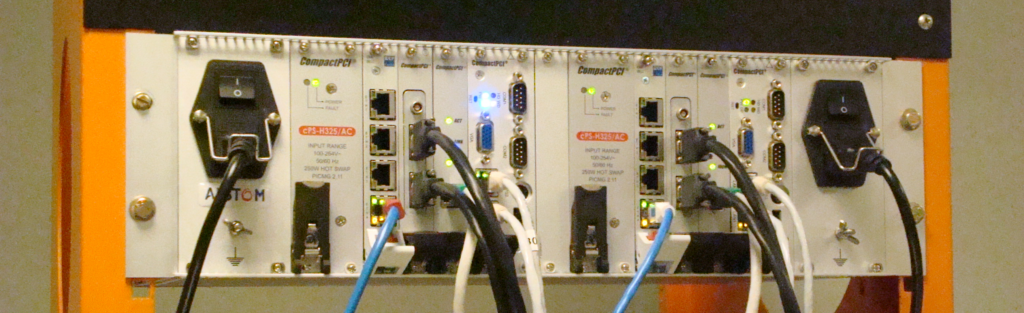
Developed by CEGELEC and later by Alstom, the ALSPA P320 system — often referred to as the “ALSPA P320 DCS” in distributed-control architectures — is not a single controller: it encompasses a family of control-system solutions spanning several generations of hardware, networks, HMI systems and engineering tools. Depending on the project, it may provide complete plant control, machine control or a specialised function.
This diversity explains why two ALSPA P320 installations may have very different architectures. Precisely identifying the series, controllers, networks and software versions is essential before any diagnostic, maintenance or modification work.
A modular, multi-generation architecture
PLCs and controllers
ALSPA P320 solutions may use PLCs from several manufacturers, often combined with a system layer, firmware or tools adapted by Alstom:
- GE Fanuc Series 90-30
C80-35, Series 90-70C80-75and PACSystemsRX3i - B&R Automation
APC620used for theMFC1000 - ADLINK
MFC3000 - B&R Automation
X20used forCE1000andCE1500 - ICS Triplex Trusted used for the protection system
CE3500
Other controllers were designed specifically for these architectures: Controbloc T20, Controbloc N20, C350, C370, CE2000 and CE3000.
Field and unit networks
Communication may use standard Ethernet networks or protocols specific to the ALSPA ecosystem. The EPL field network and the S-8000 E900 or S-8000 E920 unit networks are Ethernet-based. Earlier generations use the industrial FIP F8000 field network and the F900 unit network.
HMI and operator workstations
The legacy Centralog HMI system, subsequently renamed ALSPA HMI, evolved through the different series: Centralog VME, Centralog Unix, Centralog Windows and then ALSPA HMI. Obsolescence of VME chassis and Sun workstations has led to many migrations. From ALSPA P320 Series 5 onwards, Centralog Windows environments can also run in virtual machines.
The overall Controcad engineering tool is used on many projects, whether for machine control or a complete distributed system. Its earliest versions ran under Unix. It became a Windows application from Controcad V3 onwards. Not every installation, however, uses the same version or exactly the same components.
Names adapted to each application
Commercial and technical names vary according to the function provided by the system.
- Steam-turbine control:
TGC820,P320 TGC V1,P320 TGC V2,P320 TGC V2+,ALSPA ControSteam V3andALSPA ControSteam V4E. The ABBTurbotrolcontroller was also used on many Alstom projects and integrated into the distributed control system. - Gas-turbine control:
ALSPA ControGas. Its functional origins are linked to logic implemented in the ABBEgatrolcontroller, which was used on Alstom projects before development of Alstom’s own gas-turbine control solution. - Excitation systems:
AVR820,AVR820E,AVR920,P320 AVR V1,P320 AVR V2andALSPA ControGen. - Distributed control systems (DCS):
ALSPA P320 S4,ALSPA P320 S5,ALSPA P320 S6andALSPA ControPlant.
ALSPA P320 is used primarily in power generation. It may provide distributed control for a conventional power plant, combined-cycle plant or renewable-energy installation, control a steam or gas turbine, or less commonly provide an isolated function such as the excitation system.
Controllers from the ALSPA family are also used in a wide variety of industrial applications, including rolling mills, very-low-temperature test benches, and machine or production-line automation. These projects often operate without Controcad: the controllers are then programmed directly using P4, P8 or other software specific to the controller concerned.
Controcad, an integrated engineering tool
Controcad does more than place the programming tools for different components side by side. In a consistent project model, it describes the hardware architecture, logic, variables, exchanges, supervisory functions, operator displays and documentation. Engineers therefore work at a much higher level of abstraction than most systems provide: from this overall definition, Controcad checks consistency, establishes relationships between components, and generates the data, configurations and code required for the different targets. This cross-system integration is one of the most distinctive features of ALSPA P320.
Benefits of this integration
- A
Controcadexport can contain all the information required to back up a project. - Consistency checks identify discrepancies between different parts of the system, and certain changes are propagated automatically.
- Most logic modifications can be made, generated and prepared for loading from a common environment.
- Variable exchanges between controllers and the HMI are generated and managed centrally.
- Migrating a project from one ALSPA range to another is particularly simple: control logic programmed in
Controcadis independent of the target. All that is required is to integrate the new controller into the project to generate the code for that target.
Constraints that must be understood
This integration makes the system powerful, but also complex. Consistency checks and generation operations can take a long time. An apparently simple change to a display, alarm or label may have to be made in Controcad, then generated and loaded into the relevant components. A thorough knowledge of project organisation is therefore required to benefit from the tool without introducing inconsistencies.
Files and Oracle database
A Controcad project comprises two complementary sets:
- The files include displays, libraries, basic functions, directories holding code generated for the controllers, debugging information, settings for third-party applications, Profibus-network or
CSS-Ggateway configurations, together with documentation and its templates. They may also contain the configuration of controllers that are not fully integrated intoControcadand must be programmed and loaded using a third-party tool, for example a boiler-protection system based onTrusted CE3500. - The Oracle database contains the project’s structured configuration: variables, exchanges, function-block settings, HMI data, control-logic diagrams before conversion into code, and extensive associated information. It relies on numerous SQL constraints that directly check data integrity and consistency with every modification. A write that does not comply with the model is rejected at database level, which makes a major contribution to Controcad’s robustness, including during direct SQL work.
A project’s structured data are held in a single Oracle database. With appropriate precautions, it can be viewed and modified using an SQL client capable of connecting to Oracle. This openness makes it possible to automate operations that would be difficult to perform manually through the interface.
Scripts can, for example, apply a consistent change to many diagrams or variables, update labels associated with a functional chain, compare two projects simultaneously, merge selected data, or extract a complete system configuration in preparation for a retrofit. These operations require precise knowledge of the internal data model, dependencies and generation mechanisms.
The Controcad database is unique in the field of distributed control systems. This openness makes certain operations possible on ALSPA P320 that cannot be performed on systems from other manufacturers.
Internal organisation of a Controcad project
The interface organises project information into several trees and specialised tools.
- Hardware tree — Hard: it generally describes controllers, networks, HMI systems, links to external systems, clocks, workspaces and program execution order. Some projects, however, have specific features.
- Library tree — Lib: it contains control blocks. They may be written in
LEAor represented asFBDfunction-block diagrams, which are automatically converted toLEAwhen saved. Blocks may call other blocks or basic functions developed inLEAorC. TheBasic Function Editorcompiles these functions for the different targets managed by Controcad. - Functional tree — Fct: it defines logic and links between blocks as function-block diagrams. When a diagram is associated with a controller through a program organisation unit
POU, it is copied read-only into the hardware tree and the variables used receive an address in the target. Diagrams can also be generated for simulation and used to produce project documentation automatically. - HMI tree: it contains the configuration of control faceplates, synthetic variables, displays, alarms and HMI processing.
- Display tree — Views: it manages mimics, subdrawings and alarm sheets. The
DV-Draweditor can be launched from this tree to modify displays. - Variable grid: available from the functional tree, it is used to modify variable configuration and the processing associated with each variable.
Like any interface, this organisation has both benefits and constraints. Direct interaction with the database allows an advanced user to perform virtually any type of modification required for a specific need.
Generation and loading
Controcad can run three main types of generation.
- Controller-code generation: variable exchanges are created automatically, while retaining the option to manage selected exchanges manually. Controcad attempts to preserve existing addresses, particularly during online generation, where an exchange already in use must not be moved. Control diagrams and blocks are converted to C, then compiled using the toolchain for the target controller. Previously compiled basic functions are called directly.
- HMI generation: after consistency checking, data are exported as
.UOor.CSVfiles depending on the version. CentralogCIS, through theCCCapplication, orALSPA RTDS, then interprets these files. - Display generation: mimics, subdrawings and alarm sheets are checked and then exported in an archive. The
EXPviewer orALSPA HMIthen displays these items on the operator workstations.
The program can be loaded into targets managed by Controcad using Cell Loader from ALSPA P320 S5 onwards. Controller-manufacturer tools such as P80 or Machine Edition can also be used directly. Cell Loader nevertheless adds consistency checks for the control cell and unit network, together with management of the project-related versions.
Understand the whole system before making changes
On ALSPA P320, a modification does not always concern a single controller or file. It may affect the project database, exchanges, HMI, displays, generation and loading facilities. Combined knowledge of the engineering tools and actual system operation makes it possible to determine what must be modified, what must be regenerated and what must be verified before return to service.
Related services are presented on the ALSPA P320 maintenance, ALSPA P320 obsolescence, Board programming and qualification and Projects and case studies pages.